UAV Systems Engineering · Module 6
M6-T9: uXRCE-DDS
Two small programs and one message package connect PX4 to ROS 2: learn which side does what and where the usual failures are.
PX4 speaks uORB internally; ROS 2 speaks DDS. The uXRCE-DDS bridge is how your autonomy code on a companion computer reads the vehicle state and sends it commands. It is simple when it works and opaque when it does not, so it pays to know its parts.
Learning objectives
After this lesson, you should be able to:
- Describe the roles of the PX4 uxrce_dds_client, the Micro XRCE-DDS Agent and px4_msgs.
- Start the agent for SITL and for a serial hardware link, and verify topics in ROS 2.
- Explain the topic naming convention and the QoS settings subscribers need.
- Diagnose a message-version mismatch.
Conceptual explanation
Implementation-specific PX4 and ROS 2 details change between releases. Commands and names below follow the PX4 documentation for recent releases (v1.14 and later); verify them against the documentation of the version you run.
PX4’s internal publish-subscribe system is uORB. The uxrce_dds_client module inside the firmware publishes selected uORB topics and subscribes to selected ones through the Micro XRCE-DDS protocol. A Micro XRCE-DDS Agent process on the companion computer receives that stream and acts as a DDS participant on behalf of the flight controller, so ROS 2 nodes see ordinary topics.
ROS 2 nodes need the px4_msgs package: it contains the ROS 2 message definitions that mirror the uORB messages. The topics follow a naming convention: /fmu/out/<topic> for data from PX4 (for example /fmu/out/vehicle_odometry, /fmu/out/vehicle_status) and /fmu/in/<topic> for data to PX4 (for example /fmu/in/trajectory_setpoint, /fmu/in/offboard_control_mode, /fmu/in/vehicle_command, /fmu/in/vehicle_visual_odometry).
Engineering intuition
Treat the bridge as a typed wire. The wire is only as reliable as its two ends agree on the type: the message layout compiled into the firmware must match the px4_msgs you built your ROS 2 workspace with. A mismatch rarely produces an error; the topic simply stays silent or shows garbled fields. Whenever the bridge “does nothing”, check versions before anything else.
The second thing to remember is that this is a real-time control link, not a logging pipe. Offboard setpoints must stream continuously, subscribers must use compatible QoS, and rate and latency belong in your timing budget (lesson M7-T6).
Mathematical formulation
Not much mathematics here; the quantities that matter are rates and bandwidths. Link bandwidth for a topic is approximately the message size times the rate, plus protocol overhead:
A serial link at 921600 baud carries at most about 92 kB/s, shared by every exposed topic in both directions. This is the practical limit that tells you how many topics, at what rates, the flight controller can bridge to the companion, and why you should not blindly expose high-rate sensor topics.
Architecture and data flow
PX4 side: uxrce_dds_client is configured by parameters (port, baud and, for networking, address); in SITL it starts automatically with a UDP connection. Companion side: start the agent, then source your ROS 2 and px4_msgs workspaces and use ordinary tools:
# Companion computer: Micro XRCE-DDS Agent
# SITL (UDP, default port 8888):
MicroXRCEAgent udp4 -p 8888
# Hardware over a serial link (example device and baud rate; match the PX4 serial configuration):
MicroXRCEAgent serial --dev /dev/ttyAMA0 -b 921600

# In another terminal, with px4_msgs built and sourced:
ros2 topic list | grep fmu
ros2 topic hz /fmu/out/vehicle_odometry
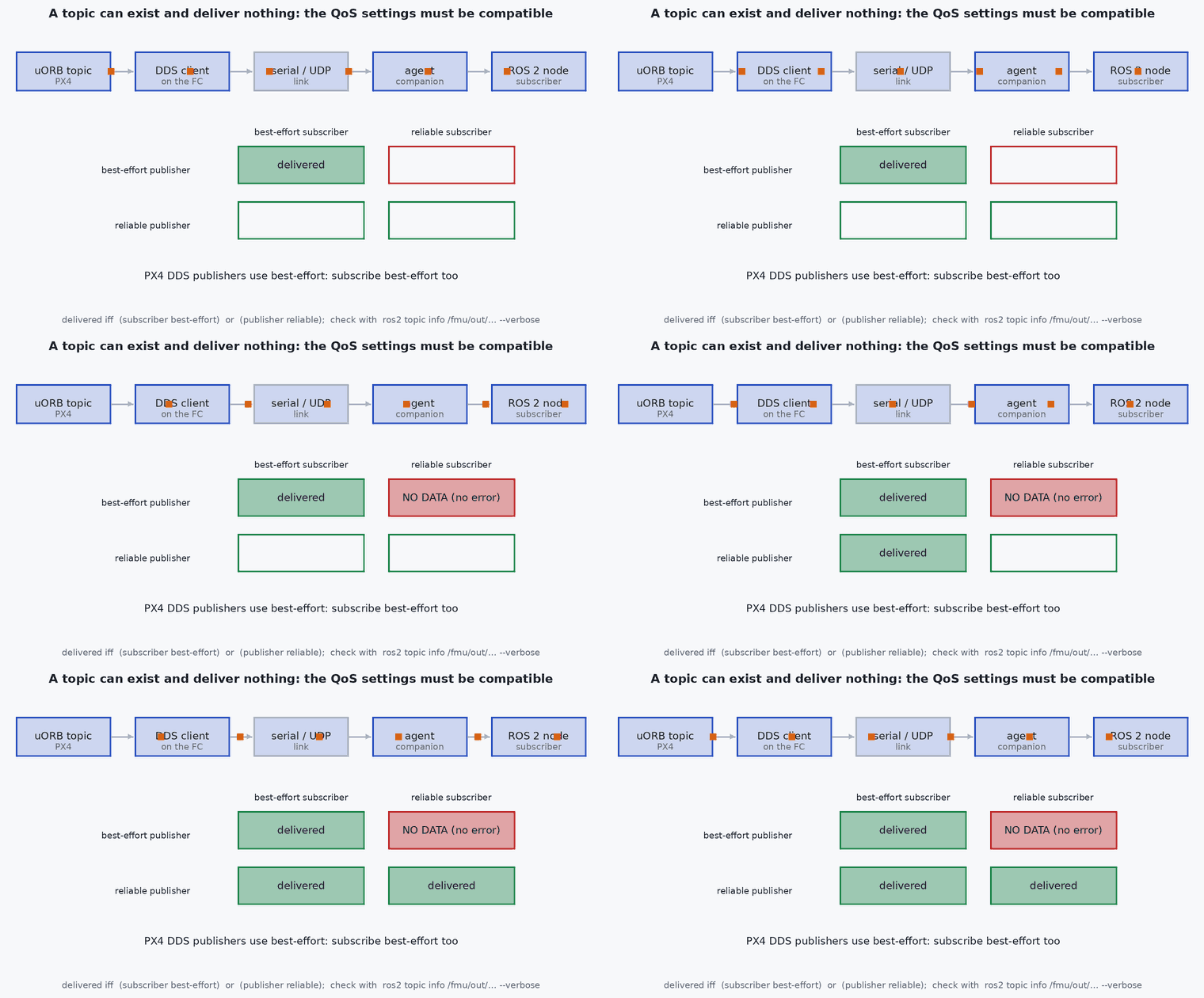
ros2 topic echo /fmu/out/vehicle_status --onceSubscribers to PX4 topics must use a compatible QoS profile. The PX4 examples use best-effort reliability and keep-last history; a subscriber that asks for reliable delivery may receive nothing:
from rclpy.qos import QoSProfile, ReliabilityPolicy, DurabilityPolicy, HistoryPolicy

px4_qos = QoSProfile(reliability=ReliabilityPolicy.BEST_EFFORT,
                     durability=DurabilityPolicy.TRANSIENT_LOCAL,
                     history=HistoryPolicy.KEEP_LAST, depth=1)
# self.create_subscription(VehicleOdometry, '/fmu/out/vehicle_odometry', self.cb, px4_qos)Real-world UAV applications
- Reading vehicle state (odometry, status, battery) into ROS 2 planners.
- Sending offboard setpoints from a companion computer.
- Feeding external odometry into PX4’s estimator (lesson M6-T10).
- Logging and monitoring flight data alongside perception data in rosbag.
Implementation example
A smoke test worth running on every new setup: confirm that the odometry topic arrives at the expected rate with plausible content. This script checks rate and a numeric sanity condition (it needs a ROS 2 environment with px4_msgs; it is syntax-checked here but not run by the test suite).
import rclpy, time
from rclpy.node import Node
from rclpy.qos import QoSProfile, ReliabilityPolicy, DurabilityPolicy, HistoryPolicy
from px4_msgs.msg import VehicleOdometry

class BridgeCheck(Node):
    def __init__(self):
        super().__init__('bridge_check')
        qos = QoSProfile(reliability=ReliabilityPolicy.BEST_EFFORT, durability=DurabilityPolicy.TRANSIENT_LOCAL,
                         history=HistoryPolicy.KEEP_LAST, depth=1)
        self.create_subscription(VehicleOdometry, '/fmu/out/vehicle_odometry', self.cb, qos)
        self.t0, self.n, self.last = time.time(), 0, None
        self.create_timer(5.0, self.report)

    def cb(self, msg):
        self.n += 1; self.last = msg

    def report(self):
        dt = time.time() - self.t0
        if self.n == 0:
            self.get_logger().error('no odometry: check the agent, the serial link and px4_msgs/firmware versions')
        else:
            z = self.last.position[2]                  # NED: negative when above the home position
            self.get_logger().info(f'{self.n/dt:.1f} Hz, z(NED)={z:.2f} m')
        self.t0, self.n = time.time(), 0

rclpy.init(); rclpy.spin(BridgeCheck())Common engineering mistakes
Mismatched px4_msgs and firmware
Topics appear but stay empty or garbled. Build px4_msgs from the branch or tag matching your PX4 version.
Reliable QoS subscribers
A reliable subscriber to a best-effort publisher receives nothing. Use the profile from the PX4 user guide.
Exposing every topic at full rate over a slow serial link
Saturates the link and starves the control-critical topics; expose only what you need.
Forgetting domain or namespace settings
Agent and nodes on different ROS domain IDs never see each other.
Ignoring timestamps
PX4 timestamps are in microseconds on the autopilot’s clock; mixing them with ROS time without conversion causes confusing latency numbers.
Failure modes
| Failure mode | How it shows up | Likely cause |
|---|---|---|
| No topics visible | ros2 topic list shows no /fmu topics | Agent not running, wrong port or baud rate, client not started on the flight controller |
| Topics visible, no data | Echo prints nothing | QoS mismatch or message version mismatch |
| Intermittent drops | Rate lower than expected and bursty | Serial link saturated or USB power or cable problems |
| Offboard mode rejected | Vehicle refuses to enter or leaves offboard mode | Setpoint stream not started or below the required rate (lesson M6-T11) |
Debugging approach
- Check the agent’s console output: it reports client connections and created entities.
- Use
ros2 topic hzandros2 topic info -vto compare rate and QoS of publisher and subscriber. - Confirm the PX4 module is running through the PX4 shell (for example the uxrce_dds_client status command) and check the relevant parameters.
- Rebuild px4_msgs from the matching tag and clean the workspace if types look wrong.
Practical exercises
- Estimate the bandwidth for 5 topics at 50 Hz with 120-byte messages and decide whether a 921600-baud link is enough.
- Run the check script in SITL and measure the odometry rate.
- Break the setup on purpose (wrong QoS, wrong domain) and note each symptom.
- List which /fmu/in topics an offboard velocity controller needs.
Interview questions
Write an answer in your own words, then reveal the model answer. Nothing is sent anywhere.
Question 1
What are the parts of the PX4 to ROS 2 bridge?
Model answer
The uxrce_dds_client running in PX4, a Micro XRCE-DDS Agent on the companion computer, and the px4_msgs ROS 2 message package whose definitions must match the firmware.
Question 2
Why can a topic exist and still produce no data?
Model answer
A QoS mismatch (for example a reliable subscriber to a best-effort publisher) or a mismatch between firmware and px4_msgs message versions.
Question 3
Why not expose all topics?
Model answer
The link has finite bandwidth shared by all topics; control-critical traffic must not be starved by high-rate telemetry.
References and further reading
Primary papers, official documentation and standards. Each claim above that is specific to a tool or version points here.