UAV Systems Engineering · Module 7
M7-T14: Communication bandwidth
Capacity, not nominal speed, is what you can use. Budget every link with protocol overhead and headroom.
A link is as full as its busiest stream. Raw images, point clouds and logs can saturate an onboard network, and a telemetry radio carries only a trickle. A bandwidth budget prevents the usual surprises: dropped messages, growing latency and a ground station that goes silent when you enable one more stream.
Learning objectives
After this lesson, you should be able to:
- Compute the data rate of image, point-cloud and message streams including overhead.
- Estimate usable capacity of serial, Ethernet and radio links.
- Allocate streams to links with priorities and headroom.
- Reduce load by compression, decimation, regions of interest and QoS.
Conceptual explanation
Established Rate arithmetic is exact; usable capacity depends on hardware and protocol and must be measured. Example numbers are illustrative.
Data rate = message size × rate. For images: width × height × bytes per pixel × frames per second (uncompressed). For point clouds: points per scan × bytes per point × scan rate. For messages: (payload + protocol overhead) × rate. Usable capacity is lower than the nominal rate because of protocol overhead, retransmissions, contention and half-duplex turnaround.
| Link | Typical use | Usable-capacity notes |
|---|---|---|
| Serial UART (8N1) | Flight controller ↔ companion (MAVLink) | 10 bits per byte on the wire, so 921 600 baud is about 92 kB/s at most before framing overhead |
| Ethernet | Sensors, lidar, DDS between computers | Nominal rate shared; multicast discovery and DDS overhead add load; use switches, not hubs |
| USB | Cameras, storage | Shared bus bandwidth between devices on one controller; USB cameras can saturate a controller |
| Telemetry radio | Ground station link | Often tens to hundreds of kbit/s; shared by all MAVLink streams |
| Video downlink | FPV or inspection video | Variable; depends on the radio, range and codec |
Reduction strategies: stream only what the consumer needs (regions of interest, decimated point clouds, compressed images), keep high-rate raw data onboard and send summaries, and use QoS (best effort, small depth) so overload sheds old data instead of building latency.
Engineering intuition
Compressing before sending is the biggest lever, but it costs CPU and latency; compressing a 1080p stream with a hardware encoder reduces it by one to two orders of magnitude, a software JPEG by perhaps 10×. Sending only a region or a lower frame rate is free. The consumer defines the requirement: a VIO front end needs the full-rate grayscale images onboard; the operator needs a modest video on the ground; the logger needs everything but can write to local storage at its own pace.
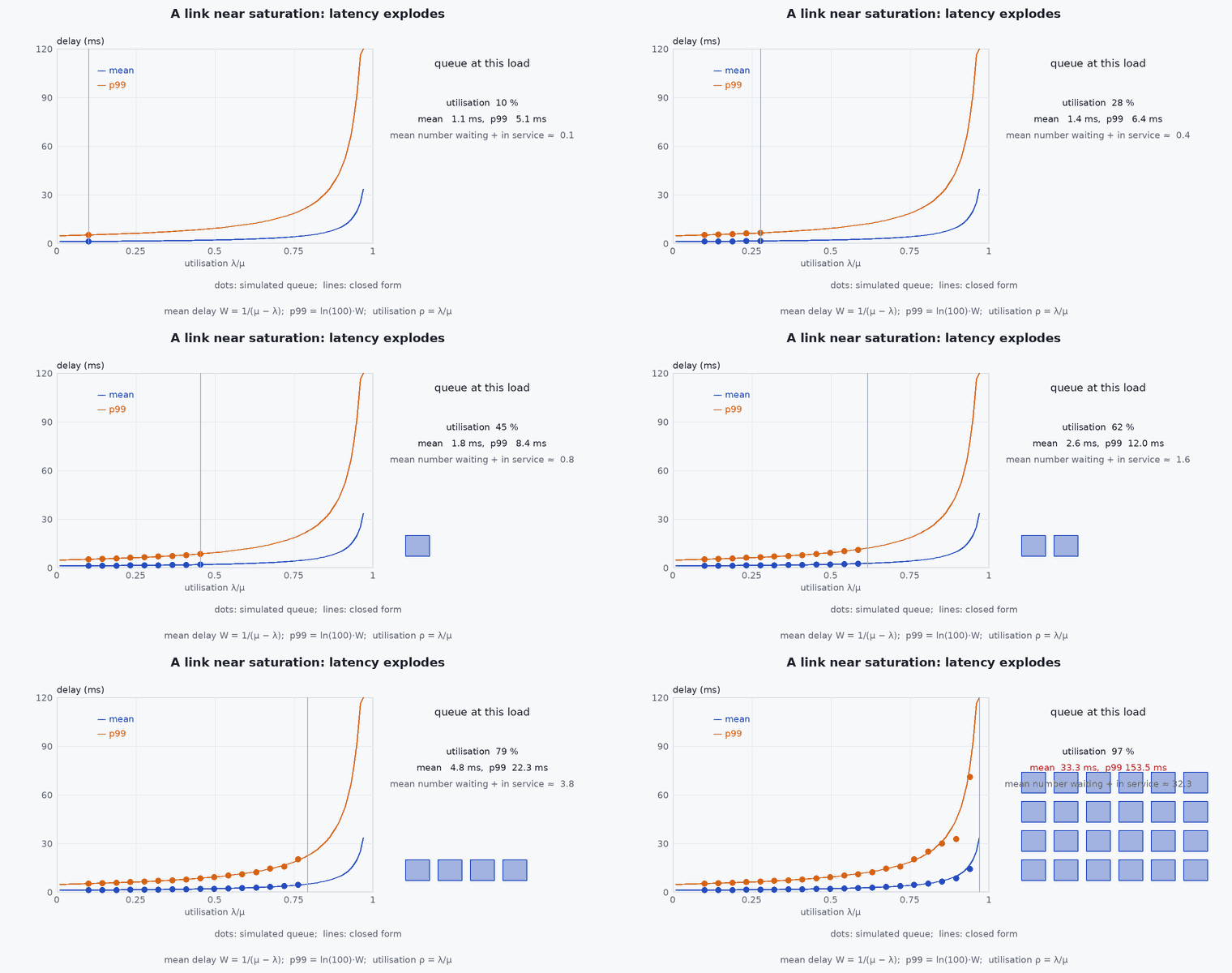
When a link is saturated you rarely see an error. You see rising latency, bursty arrivals and silently dropped samples: precisely the symptoms of a timing problem. Check link utilisation before chasing a software cause.
Mathematical formulation
Stream rates:
Examples: a 1280×720 8-bit grayscale stream at 30 fps is 1280 × 720 × 1 × 30 = 27.6 MB/s = 221 Mbit/s; a 640×480 stream at 30 fps is 9.2 MB/s (74 Mbit/s). A 64-beam lidar producing 1.3 million points per second at 16 bytes per point is 20.8 MB/s. The usable Ethernet capacity at a nominal 1 Gbit/s is perhaps 940 Mbit/s of payload for large frames. The headroom check for a link of capacity and streams with rates :
Latency from serialisation: a message of bytes on a link of rate adds n/r seconds per hop (for example a 1 MB frame at 100 Mbit/s takes 80 ms to send), which is a lower bound on added latency before any queueing.
- , , ,
- image width, height, bytes per pixel, frame rate.
- ,
- points per scan and bytes per point.
- ,
- link capacity and headroom fraction.
Architecture and data flow
Sensors → onboard switch → companion (perception) and logger; companion → flight controller (UART, MAVLink/DDS at tens of Hz, small messages); flight controller → telemetry radio → ground station (few streams at low rates); companion → video encoder → downlink radio. Each hop has its own rate and its own queue; the budget lists them with source, destination, protocol, rate and priority (the interface control document carries the same table).
Real-world UAV applications
- Deciding which topics to bridge to the ground.
- Choosing between a camera on USB and on MIPI CSI.
- Setting MAVLink stream rates for a serial telemetry link.
- Sizing the onboard network for a lidar plus cameras plus logging.
Implementation example
This runs as shown. A link-budget checker: streams with sizes and rates, links with nominal capacity and an efficiency factor, and a headroom rule; it flags overloaded links and computes the MAVLink serial budget.
streams = [  # name, link, bytes per message, rate Hz, protocol overhead bytes per message
    ('cam0 gray 640x480', 'onboard-eth', 640 * 480, 30, 80), ('cam1 gray 640x480', 'onboard-eth', 640 * 480, 30, 80),
    ('lidar points', 'onboard-eth', 20_800_000 // 20, 20, 60), ('imu 400 Hz', 'onboard-eth', 60, 400, 80),
    ('mavlink attitude', 'uart', 28, 50, 12), ('mavlink local pos', 'uart', 28, 50, 12), ('mavlink odometry in', 'uart', 233, 30, 12), ('mavlink heartbeat', 'uart', 9, 1, 12),
    ('telemetry attitude', 'radio', 28, 4, 12), ('telemetry gps', 'radio', 30, 2, 12), ('telemetry status', 'radio', 31, 2, 12)]
links = {'onboard-eth': (1e9, 0.94, 8), 'uart': (921600, 0.80, 10), 'radio': (57600, 0.75, 10)}   # nominal bit/s, usable fraction, wire bits per byte
h = 0.3
def check(streams, verbose=True):
    failed = []
    for name, (bps, eff, bits_per_byte) in links.items():
        load = sum((b + o) * r * bits_per_byte for s, l, b, r, o in streams if l == name); cap = bps * eff
        if verbose: print(f"{name:>11}: load {load / 1e6:8.3f} Mbit/s of usable {cap / 1e6:8.3f} ({load / cap:5.1%}) -> {'OK' if load <= (1 - h) * cap else 'OVER BUDGET'}")
        if load > (1 - h) * cap: failed.append(name)
    return failed
print("baseline over budget:", check(streams))
more = streams + [('cam2 gray 1280x720', 'onboard-eth', 1280 * 720, 30, 80), ('cam3 gray 1280x720', 'onboard-eth', 1280 * 720, 30, 80)]
print("with two more 720p cameras over budget:", check(more))
assert check(streams, False) == [] and check(more, False) == ['onboard-eth']
assert abs(1280 * 720 * 30 * 8 / 1e6 - 221.184) < 1e-6 and abs(640 * 480 * 30 / 1e6 - 9.216) < 1e-9Common engineering mistakes
Using nominal link rates
Usable capacity is lower; measure it.
Forgetting protocol and discovery overhead
DDS discovery and message headers add real load.
Sending raw images to the ground
Compress, crop or decimate; send what the operator needs.
No headroom on real-time links
Bursts push latency up when load is near capacity.
Sharing a USB controller between several cameras
They contend for the same bandwidth.
Failure modes
| Failure mode | How it shows up | Likely cause |
|---|---|---|
| Telemetry stalls when a stream is enabled | Ground station freezes or drops | Radio link saturated by added streams |
| Latency and drops on the onboard network | Late camera frames | Aggregate load near link capacity, multicast flooding |
| Frame drops on USB cameras | Missing frames | Several cameras on one USB controller |
| Rising delay over time | Data age grows | Unbounded queues on an overloaded link |
Debugging approach
- Measure per-link utilisation (ifconfig/ip -s, iftop, ros2 topic bw).
- Check each topic’s rate and size with ros2 topic hz and bw.
- Temporarily disable streams one by one to find the offender.
- Check the MAVLink stream rates and the radio’s reported link quality.
Practical exercises
- Compute the data rate of four 1280×800 mono cameras at 20 fps and decide which link can carry them.
- Reduce the load of the lidar stream by decimation and by cropping and compare the savings.
- Compute the MAVLink budget of ten message types at their rates for a 57 600 baud radio.
- Draw the bandwidth map of your vehicle with streams, links and loads.
Interview questions
Write an answer in your own words, then reveal the model answer. Nothing is sent anywhere.
Question 1
How do you budget a communication link?
Model answer
Compute each stream’s rate including overhead, sum per link, compare with usable (not nominal) capacity and require headroom; reduce load by compression, decimation and region of interest where needed.
Question 2
Why do saturated links look like timing problems?
Model answer
Queues grow, delays vary and samples drop silently, producing jitter and stale data rather than errors.
Question 3
What data should stay onboard?
Model answer
High-rate raw sensor data needed only by onboard consumers; send summaries and operator-relevant data over the limited downlink.
References and further reading
Primary papers, official documentation and standards. Each claim above that is specific to a tool or version points here.