UAV Systems Engineering · Module 7
M7-T17: Interface Control Documents
Most integration failures are interface failures. Write the contract down, check it with a script, and test it.
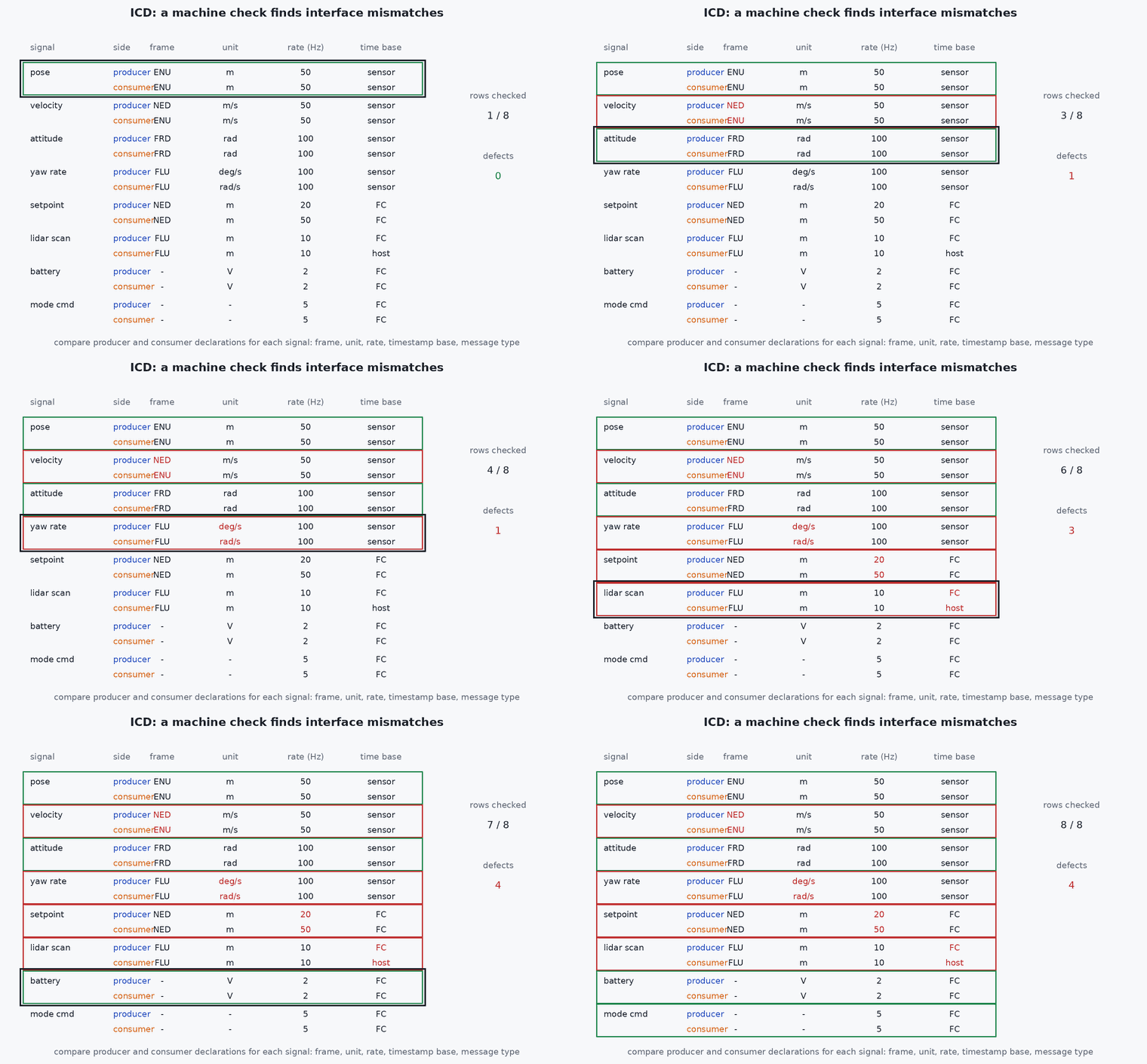
When the perception team publishes an odometry message and the autopilot team consumes it, what are the units, the frame, the covariance convention, the rate, the latency budget and the behaviour when it stops? If the answers live in people’s heads, the first flight will find the disagreement. An ICD records them, and a script can check it.
Learning objectives
After this lesson, you should be able to:
- List the attributes that must be specified for every interface.
- Write an interface entry with units, frames, rates, timing and failure behaviour.
- Check an ICD automatically for missing fields and inconsistencies between producer and consumer.
- Version, review and verify interfaces through change control and interface tests.
Conceptual explanation
Established ICDs are standard systems-engineering artefacts. The attribute list below is a practical minimum for flight software; programme standards may require more.
An Interface Control Document defines everything two components need to know about each other so that each can be built and tested independently. For each interface the entry should state:
| Attribute | Content | Typical omission |
|---|---|---|
| ID and name | Unique, stable identifier | Names that change between documents |
| Producer and consumer | Owning component for each end | Unknown consumers |
| Physical / transport | Bus or network, protocol, topic or message id, QoS | QoS and queue depth |
| Data definition | Fields, types, units, ranges, resolution | Units, valid ranges |
| Frames and conventions | Coordinate frames, quaternion order, covariance layout, time base | The most common cause of flipped axes |
| Rate and latency | Nominal rate, tolerance, maximum age, latency budget | Maximum age |
| Timing and timestamps | What the timestamp refers to and its clock | Which clock |
| Validity and failure behaviour | Validity flags, timeout, what each side does on loss, invalid or stale data | Failure behaviour |
| Version and change policy | Version number, compatibility rule, owners to notify | Compatibility rule |
Engineering intuition
Think of the ICD as the specification you would give to someone who has never spoken to the other team. If a field says “position” the reader needs to know metres or centimetres, which frame, which origin, relative to what time. If the sender stops, what does the receiver do? Having to write the failure behaviour is the useful part: it forces the conversation about the failsafe before the crash.
Machine-checkable ICDs are even better: a structured file (YAML or JSON) from which message definitions, documentation and validation scripts can be generated. Then “producer rate 20 Hz, consumer expects 30 Hz” is a failed check in review, not a surprise in flight.
Mathematical formulation
Consistency rules that can be checked mechanically between a producer and a consumer of the same interface:
where is the rate, the latency contributions, and the last condition ties the consumer’s loss-detection time to the hazard analysis: too short and it triggers spuriously, too long and the failure is not handled in time. For a message of bytes at rate on a link, the bandwidth is 8 bits per second (plus protocol overhead), which must fit the link budget from the previous lesson.
- , ,min
- producer rate and minimum rate the consumer needs.
- latency allocated to this interface in the end-to-end budget.
- number of consecutive missed messages that declare loss.
Architecture and data flow
Architecture diagram → interface list (IDs) → ICD source file (YAML/JSON) in the repository → generated documentation, message definitions and unit tests → review by producer and consumer owners → baseline tag → interface tests in SIL, HIL and flight. Changes go through the same review; the version in the message (or a version topic) lets the consumer reject incompatible data.
Real-world UAV applications
- Specifying the external-odometry interface between a VIO node and the autopilot.
- Reviewing integration of a third-party sensor.
- Preparing the interface section of a safety case.
- Generating tests that check every interface against its specification.
Implementation example
This runs as shown. A small ICD as data, and a checker that finds missing attributes and producer-consumer inconsistencies. The example interfaces are illustrative.
REQUIRED = ['id', 'producer', 'consumer', 'transport', 'fields', 'frame', 'rate_hz', 'rate_min_hz', 'max_age_s', 'timestamp', 'timeout_s', 'loss_action', 'version']
icd = [
  dict(id='IF-ODOM-01', producer='vio', consumer='autopilot', transport='DDS /fmu/in/vehicle_visual_odometry (best-effort, depth 1)',
       fields={'position': 'm', 'q': 'unitless (w,x,y,z)', 'pose_covariance': 'm^2, rad^2'}, frame='FRD body, NED world', rate_hz=30, rate_min_hz=20, max_age_s=0.1,
       timestamp='image exposure midpoint, vehicle clock', timeout_s=0.5, loss_action='autopilot stops fusing EV, falls back to non-EV mode, raises warning', version='1.2'),
  dict(id='IF-SP-01', producer='planner', consumer='autopilot', transport='DDS /fmu/in/trajectory_setpoint (best-effort, depth 1)',
       fields={'position': 'm', 'velocity': 'm/s', 'yaw': 'rad'}, frame='NED', rate_hz=20, rate_min_hz=30, max_age_s=0.15,
       timestamp='vehicle clock', timeout_s=0.3, loss_action='autopilot leaves offboard and holds', version='1.0'),
  dict(id='IF-HB-01', producer='companion', consumer='autopilot', transport='MAVLink HEARTBEAT', fields={'status': 'enum'}, frame='n/a', rate_hz=1, rate_min_hz=1,
       max_age_s=3.0, timestamp='n/a', timeout_s=3.0, version='1.0')]                               # note: no loss_action specified
def check(icd):
    problems = []
    for i in icd:
        for k in REQUIRED:
            if k not in i or i[k] in ('', None): problems.append(f"{i['id']}: missing '{k}'")
        if i.get('rate_hz', 0) < i.get('rate_min_hz', 0): problems.append(f"{i['id']}: producer rate {i['rate_hz']} Hz below consumer minimum {i['rate_min_hz']} Hz")
        if i.get('rate_hz') and i.get('timeout_s') is not None and i['timeout_s'] < 3 / i['rate_hz'] - 1e-9: problems.append(f"{i['id']}: timeout {i['timeout_s']} s shorter than 3 message periods ({3 / i['rate_hz']:.3f} s): spurious loss likely")
        if i.get('rate_hz') and i.get('max_age_s') is not None and i['max_age_s'] < 1 / i['rate_hz']: problems.append(f"{i['id']}: max age shorter than the message period")
    return problems
problems = check(icd)
for p in problems: print("PROBLEM:", p)
assert any('IF-SP-01' in p and 'below consumer minimum' in p for p in problems) and any('IF-HB-01' in p and 'loss_action' in p for p in problems)
assert not any('IF-ODOM-01' in p for p in problems)Common engineering mistakes
Describing fields without units and frames
The classic source of mirrored motion and scale errors.
No failure behaviour
The most important column is the one most often left blank.
Specifying a nominal rate only
Give the minimum acceptable rate and the maximum age.
Unversioned changes
A silent change on one side breaks the other; version and notify.
An ICD that is never tested
Write an interface test per ID and run it in SIL and HIL.
Failure modes
| Failure mode | How it shows up | Likely cause |
|---|---|---|
| Mirrored or scaled motion | Vehicle goes the wrong way or too far | Frame, unit or quaternion-order mismatch |
| Spurious loss events | Failsafes trigger in normal flight | Timeout shorter than a few message periods or jitter |
| Silent degradation on loss | No warning, strange behaviour | No specified failure behaviour |
| Break after an update | Interface fails after a release | No version check or compatibility rule |
Debugging approach
- Compare the actual message rate, age and fields in a log against the ICD entry.
- Run the checker in continuous integration.
- Inject the failure (stop the stream, send stale data) and compare with the specified behaviour.
- Review the ICD at every release with both owners.
Practical exercises
- Write the ICD entry for the camera-trigger feedback interface between flight controller and companion.
- Add a check to the script: producer and consumer frame fields must match or specify a conversion.
- Compute the bandwidth of the three example interfaces.
- Define the compatibility rule for a message version change (add field, rename field, change unit).
Interview questions
Write an answer in your own words, then reveal the model answer. Nothing is sent anywhere.
Question 1
What belongs in an interface specification beyond the message fields?
Model answer
Units, frames and conventions, rates and maximum age, timestamp meaning and clock, validity flags, timeouts, behaviour on loss or invalid data, and the version and change policy.
Question 2
Why is failure behaviour part of the ICD?
Model answer
The consumer’s response to a missing, stale or invalid message is a safety function that both teams must agree on and test; leaving it implicit hides hazards.
Question 3
How can you make an ICD enforceable?
Model answer
Keep it as structured data, generate definitions and tests from it, run a consistency checker in CI, and verify each interface in SIL, HIL and flight tests.
References and further reading
Primary papers, official documentation and standards. Each claim above that is specific to a tool or version points here.