UAV Systems Engineering · Module 6
M6-T2: Introduction to ArduPilot
ArduPilot and PX4 are both capable open-source autopilots. Choose on fit, licence and interface, and prototype in simulation first.
This course uses PX4 for its examples, but ArduPilot is equally widely deployed, and you will meet it in industry. The right question is rarely “which is better”; it is “which fits this vehicle, this team and this licence constraint”. The ideas in this module transfer directly: estimators, controllers, MAVLink, offboard control and logs exist in both.
Learning objectives
After this lesson, you should be able to:
- Describe ArduPilot’s structure (vehicle code, libraries, HAL) and its vehicle types.
- Compare ArduPilot and PX4 on licence, architecture, interfaces and tooling.
- Map concepts between the two (modes, parameters, logs, companion links).
- Choose between them with a documented, testable rationale.
Conceptual explanation
Implementation-specific Both projects change often and each has strengths in different areas. Statements here are general and based on the public documentation at the time of writing; check the current documentation of both projects before deciding. No performance ranking is claimed.
ArduPilot is an open-source autopilot with separate vehicle codebases (ArduCopter, ArduPlane, Rover, ArduSub, Blimp, Antenna Tracker) built on shared libraries and a hardware abstraction layer (AP_HAL) supporting several operating-system back ends (ChibiOS on most flight controllers, and Linux and others). It is licensed under the GPLv3, whereas PX4 uses a permissive BSD 3-clause licence. The licence matters if you plan to ship modified firmware in a closed product.
Differences that commonly matter in a project:
| Aspect | ArduPilot | PX4 |
|---|---|---|
| Licence | GPLv3 (copyleft) | BSD 3-clause (permissive) |
| Structure | Per-vehicle code on shared libraries and AP_HAL | Modular stack, uORB bus, modules per function |
| Companion interface | MAVLink; DDS interface available in recent versions; MAVROS widely used | MAVLink; uXRCE-DDS native ROS 2 bridge; MAVROS also used |
| Scripting | Lua scripting on the flight controller | No equivalent embedded scripting layer in the main stack (check current docs) |
| Ground station | Mission Planner, QGroundControl, MAVProxy | QGroundControl |
| Configuration | Parameters, many mode and failsafe options | Parameters, structured airframe configuration |
Engineering intuition
The two projects arrived at similar solutions to the same problems: an EKF estimator, a cascaded controller, MAVLink, modes and failsafes. The practical differences are in the surroundings: licensing, the way the code is organised, how you script or extend it, and which hardware and tools your supplier supports. A team that has strong experience with one will be more effective with it than the ideal choice on paper.
For an autonomy project the stronger question is the interface to your software. Check, for the specific versions you will use, how setpoints are sent, how external position is fed in, what timestamps are expected and how failsafes behave when the companion goes silent. The details differ, and the safe integration depends on them.
Mathematical formulation
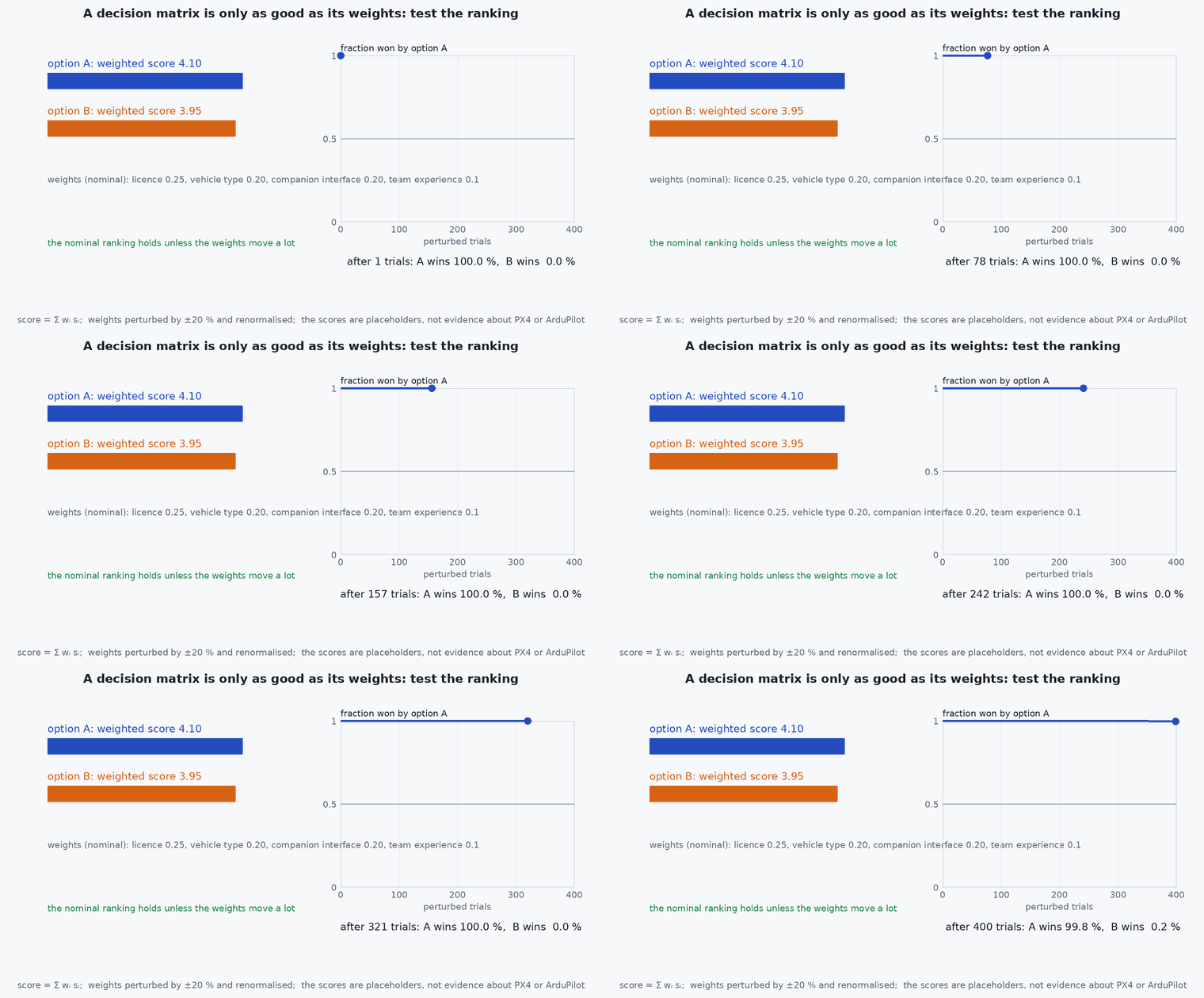
No new mathematics: both use the same estimation and control theory. A useful quantitative step is a decision matrix with weighted criteria, which makes the rationale explicit and reviewable:
The weights encode project priorities (licence constraints can be a hard gate rather than a weighted criterion), and each score should cite evidence: a documentation page, a simulation result or a test. A sensitivity check, varying each weight by ±20 %, shows whether the ranking is robust or an artefact of one assumption.
Architecture and data flow
The companion-computer data flow is the same shape for both: sensors → autopilot estimator → state out (MAVLink or DDS) → companion perception and planning → setpoints in (MAVLink or DDS) → autopilot controller. The differences are the message sets and conventions: for example the frame (ENU in ROS, NED in the autopilot) conversions, the message that carries external odometry, and the mode in which external setpoints are accepted (PX4 offboard; ArduPilot guided). Document these in the interface control document.
Real-world UAV applications
- Selecting an autopilot for a new platform and recording the decision.
- Porting a companion-computer application between the two.
- Using ArduPilot’s Lua scripting for small on-board behaviours.
- Comparing the two in SITL on the same mission as a sanity check.
Implementation example
A decision matrix as a small script so the weights and scores are versioned with the project. The numbers below are placeholders to show the mechanics, not a statement about either autopilot: fill in your own evidence.
import numpy as np
criteria = ['licence fits product', 'vehicle type supported', 'companion interface fit', 'team experience', 'supplier hardware support', 'tooling for tests']
w = np.array([0.25, 0.20, 0.20, 0.15, 0.10, 0.10])            # project priorities (sum to 1)
scores = {'option A': np.array([5, 4, 4, 3, 4, 4]), 'option B': np.array([3, 4, 5, 4, 4, 4])}   # PLACEHOLDERS: replace with evidence-based scores
for name, s in scores.items(): print(name, round(float(w @ s), 2))
rng = np.random.default_rng(0); wins = {k: 0 for k in scores}
for _ in range(2000):                                         # sensitivity: perturb weights by up to +-20 %
    wp = w * (1 + rng.uniform(-0.2, 0.2, w.size)); wp /= wp.sum()
    best = max(scores, key=lambda k: wp @ scores[k]); wins[best] += 1
print('ranking stability:', {k: v / 2000 for k, v in wins.items()})
assert abs(w.sum() - 1) < 1e-12Common engineering mistakes
Choosing from reputation
Decide from documented requirements and a prototype.
Ignoring the licence
A copyleft or permissive licence has product consequences: decide early with legal advice.
Assuming equivalent behaviour
Mode names, failsafe defaults and parameters differ; test the behaviour you rely on.
Mixing documentation
Parameter names from one project do not exist in the other.
No exit plan
Keep the autonomy software behind a thin interface so the autopilot can change.
Failure modes
| Failure mode | How it shows up | Likely cause |
|---|---|---|
| Porting surprises | Behaviour differs after switching autopilot | Frame, timestamp or mode-semantic differences not tested |
| Unsupported hardware | Board not supported by the chosen firmware | Supplier support not checked before purchase |
| Licence conflict found late | Product plan blocked | Licence not considered at selection |
| Wrong version documentation | Instructions do not work | Docs for a different release |
Debugging approach
- Reproduce the same mission in SITL on both before deciding.
- Diff the parameter sets and failsafe behaviours for the same scenario.
- Check the exact firmware version against the documentation version.
- Keep a mapping table of concepts and parameter names for your project.
Practical exercises
- Make a decision matrix for a hypothetical inspection quadrotor with a ROS 2 companion, citing the documentation for each score.
- List the failsafe behaviours of both for loss of the companion link and compare them (read both documents).
- Write the interface description for external odometry for each autopilot.
- Identify the licence obligations for shipping a modified firmware under each.
Interview questions
Write an answer in your own words, then reveal the model answer. Nothing is sent anywhere.
Question 1
How would you choose between PX4 and ArduPilot?
Model answer
From requirements: vehicle type, licence constraints, companion interface, hardware and team experience, then confirm with a short SITL prototype of the actual mission. No blanket ranking.
Question 2
What licence difference matters most?
Model answer
ArduPilot is GPLv3 (copyleft) and PX4 is BSD 3-clause (permissive); distributing modified firmware in a closed product has different obligations under each, so it should be settled early with legal advice.
Question 3
What concepts transfer between them?
Model answer
EKF-based estimation, cascaded control, MAVLink, flight modes and failsafes, logging and external setpoints: names and parameters differ but the architecture and the debugging approach are the same.
References and further reading
Primary papers, official documentation and standards. Each claim above that is specific to a tool or version points here.