UAV Systems Engineering · Module 6
M6-T11: Offboard control
Offboard mode hands the vehicle to your software, and PX4 will take it back the moment your software goes quiet. Build the handshake carefully.
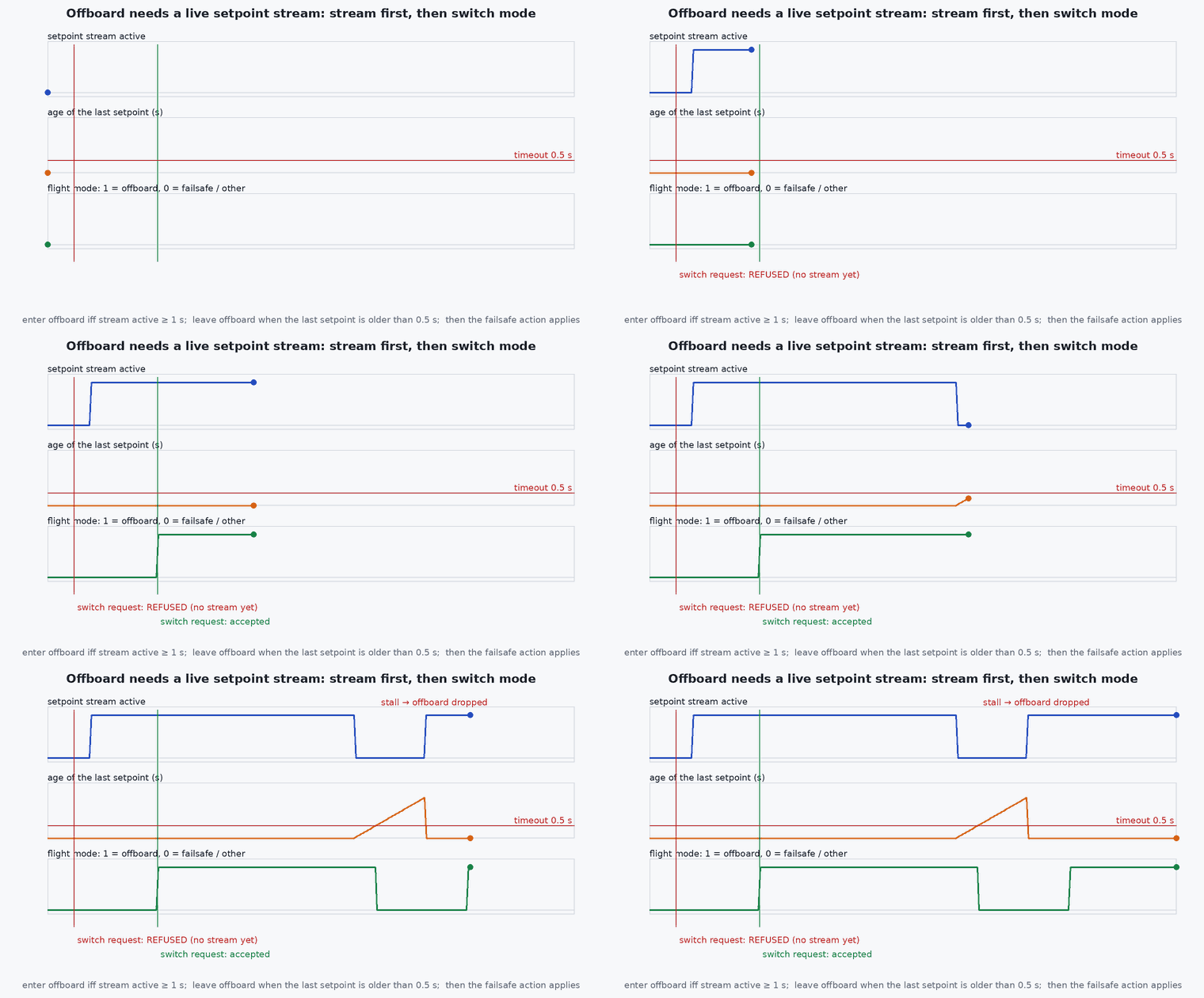
Offboard control is how autonomy code on the companion flies the vehicle. The interface is deliberately strict: it only works while a stream of setpoints is arriving, which makes the link itself a safety mechanism. Understanding that rule turns most “it won’t arm” and “it dropped out of offboard” problems into one-line fixes.
Learning objectives
After this lesson, you should be able to:
- Describe the offboard handshake and the role of the setpoint stream.
- Choose the control mode flags in OffboardControlMode that match the setpoints being sent.
- Send position and velocity setpoints in NED and handle the mode and arm commands.
- List the failsafes that apply when the stream is lost.
Conceptual explanation
Implementation-specific This follows the PX4 offboard documentation and ROS 2 examples for recent releases. Message fields, parameter names and defaults vary between versions: check the documentation for the one you fly.
In offboard mode PX4 follows setpoints supplied by an external system instead of the pilot or a stored mission. Three ingredients are required:
OffboardControlModemessages say which quantities the external system controls (position, velocity, acceleration, attitude, body rate…).- A setpoint message of the matching type (for example
TrajectorySetpointfor position, velocity or acceleration). - A continuous stream of both: PX4’s documentation states a rate above 2 Hz; in practice 10–50 Hz is typical. If the stream stops, PX4 exits offboard mode and applies its failsafe.
Engineering intuition
The stream is both the command and the heartbeat. PX4 refuses to enter offboard mode without it, so a node that sends the mode command immediately at start-up is rejected: stream for a second or so first. It also means your autonomy software’s timing health is a flight-safety property: a node that stalls for 500 ms during a garbage-collection pause or an expensive planning step makes the vehicle drop out of offboard. Run the setpoint publisher in its own thread or node with its own timer, and let the planner feed it, instead of publishing from inside the planner.
Mathematical formulation
Position setpoints are in the NED frame with negative above the home position. A velocity setpoint in NED that is computed from a ROS ENU velocity is . A smooth reference prevents the position controller from receiving unreachable steps; limit setpoint changes by the vehicle’s acceleration limit:
Timeout arithmetic: with a stream at Hz and an allowed gap of 0.5 s PX4 tolerates losing about 0.5 consecutive messages: at 20 Hz, ten. Choose the rate so that a single dropped message does not matter and a stall does.
Architecture and data flow
Companion planner → trajectory setpoint publisher (own timer, constant rate) → /fmu/in/offboard_control_mode and /fmu/in/trajectory_setpoint → PX4 position controller → attitude → motors. Commands (arm, mode) go to /fmu/in/vehicle_command; status returns on /fmu/out/vehicle_status so the node can confirm the mode switched rather than assuming it did. Failsafe behaviour on loss of the offboard stream is set by PX4 parameters such as the offboard loss timeout and action (check the PX4 failsafe documentation for the parameter names of your version).
Real-world UAV applications
- Running a custom planner or MPC on the companion computer.
- Visual servoing and precision landing logic.
- Executing waypoint missions generated by autonomy software in SITL and on hardware.
- Research controllers that bypass PX4’s position loop by sending attitude or body-rate setpoints.
Implementation example
A minimal ROS 2 node that follows the documented pattern: stream for ten cycles, then set offboard mode and arm, then fly to a position. It is syntax-checked but not run by the tests (it needs ROS 2, px4_msgs and a PX4 instance); run it in SITL first. Check field and constant names against your px4_msgs version.
import math, rclpy
from rclpy.node import Node
from rclpy.qos import QoSProfile, ReliabilityPolicy, DurabilityPolicy, HistoryPolicy
from px4_msgs.msg import OffboardControlMode, TrajectorySetpoint, VehicleCommand

class OffboardDemo(Node):
    def __init__(self):
        super().__init__('offboard_demo')
        qos = QoSProfile(reliability=ReliabilityPolicy.BEST_EFFORT, durability=DurabilityPolicy.TRANSIENT_LOCAL,
                         history=HistoryPolicy.KEEP_LAST, depth=1)
        self.mode_pub = self.create_publisher(OffboardControlMode, '/fmu/in/offboard_control_mode', qos)
        self.sp_pub = self.create_publisher(TrajectorySetpoint, '/fmu/in/trajectory_setpoint', qos)
        self.cmd_pub = self.create_publisher(VehicleCommand, '/fmu/in/vehicle_command', qos)
        self.n = 0
        self.create_timer(0.05, self.tick)                      # 20 Hz stream, on its own timer

    def now_us(self):
        return int(self.get_clock().now().nanoseconds // 1000)

    def command(self, cmd, p1=0.0, p2=0.0):
        m = VehicleCommand()
        m.timestamp = self.now_us(); m.command = cmd; m.param1 = p1; m.param2 = p2
        m.target_system = 1; m.target_component = 1; m.source_system = 1; m.source_component = 1; m.from_external = True
        self.cmd_pub.publish(m)

    def tick(self):
        mode = OffboardControlMode(); mode.timestamp = self.now_us(); mode.position = True   # we control position only
        self.mode_pub.publish(mode)
        sp = TrajectorySetpoint(); sp.timestamp = self.now_us()
        sp.position = [0.0, 0.0, -5.0]                         # NED: 5 m above the home position
        sp.yaw = 0.0                                           # facing north
        self.sp_pub.publish(sp)
        if self.n == 20:                                       # after about 1 s of streaming
            self.command(VehicleCommand.VEHICLE_CMD_DO_SET_MODE, 1.0, 6.0)          # custom mode: offboard (see PX4 docs)
            self.command(VehicleCommand.VEHICLE_CMD_COMPONENT_ARM_DISARM, 1.0)
        self.n += 1

rclpy.init(); rclpy.spin(OffboardDemo())Common engineering mistakes
Sending the mode command before streaming
PX4 rejects offboard mode without an existing setpoint stream.
Publishing setpoints from a slow planner callback
A planning stall stops the stream and drops offboard mode: decouple the publisher.
Frame errors on setpoints
NED with negative up; a positive asks the vehicle to go underground.
Not checking vehicle_status
Assuming the mode switched; read back nav_state and arming_state.
No plan for stream loss
Decide and test what happens when the link or the node dies (hold, return, land).
Failure modes
| Failure mode | How it shows up | Likely cause |
|---|---|---|
| Will not enter offboard | Mode command ignored | No stream, stream below the minimum rate, wrong control-mode flags, or pre-arm checks failing |
| Drops out of offboard in flight | Vehicle switches mode and hovers or returns | Stream stalled (CPU load, GC pause, network) |
| Vehicle climbs or descends the wrong way | Altitude control inverted | Sign of in NED |
| Jerky motion | Velocity steps or oscillation | Unsmoothed setpoints; setpoint rate too low |
Debugging approach
- Watch
ros2 topic hzon the two /fmu/in topics: the rate must be steady. - Read vehicle_status for nav_state and arming_state; check the PX4 console for the reason a mode switch was refused.
- Plot the setpoint against the measured local position in the log.
- Inject a deliberate stream pause in SITL and confirm the failsafe behaves as configured.
Practical exercises
- Modify the node to fly a 5 m square in NED, rate-limiting the setpoint to 2 m/s.
- Measure the longest stall of your node’s timer using a monotonic clock and compare with the offboard timeout.
- Switch the node to velocity control and set the matching flags in OffboardControlMode.
- Add a status subscriber that logs mode changes and prints a warning on leaving offboard.
Interview questions
Write an answer in your own words, then reveal the model answer. Nothing is sent anywhere.
Question 1
Why does PX4 require a setpoint stream before offboard mode?
Model answer
The stream proves the external controller is alive. PX4 refuses to enter offboard without it and exits offboard if it stops, giving a built-in failsafe against a dead companion.
Question 2
What does OffboardControlMode tell PX4?
Model answer
Which control quantities the external system supplies (position, velocity, acceleration, attitude, body rate…), so PX4 knows which controllers to run and which setpoint fields to use.
Question 3
How do you make offboard control robust against a slow planner?
Model answer
Publish setpoints from a dedicated fixed-rate timer or node, feed it from the planner through a buffer, and test deliberate stalls against the configured failsafe.
References and further reading
Primary papers, official documentation and standards. Each claim above that is specific to a tool or version points here.